Explore

We Make Everything
SimReady

From small objects to buildings to environments, every asset for your simulation.

Trusted by

Trusted by

NdotLight builds the Data Infrastructure
that bridges the Real and the Virtual.

NdotLight builds the Data Infrastructure that bridges the Real and the Virtual.

Directly Deployable, Simulation-ready assets
for any kind of objects.

Directly Deployable, Simulation-ready assets for any kind of objects.

Experience TRINIX
to Close Ideal-to-Real Gap Faster

Experience TRINIX to
Close Ideal-to-Real Gap Faster

Any input to be Simulation Ready – Text, Image, Video, CAD

NURBS based CAD model. Not Mesh

Infinite variation via parameters and prompts, applied directly to the generated model

Automatically infer and inject physics and articulation data

Separate visual and collision mesh for smooth simulation

Self-corrective closed loop to ensure high-fidelity, high-quality assets

1,000+ variation model from 1 asset

Deployable directly to simulation platform – Ominverse Isaac Sim, MuJoCo, Gazebo
From Prompt to SimReady
End to End Automated

From Prompt to SimReady
End to End Automated

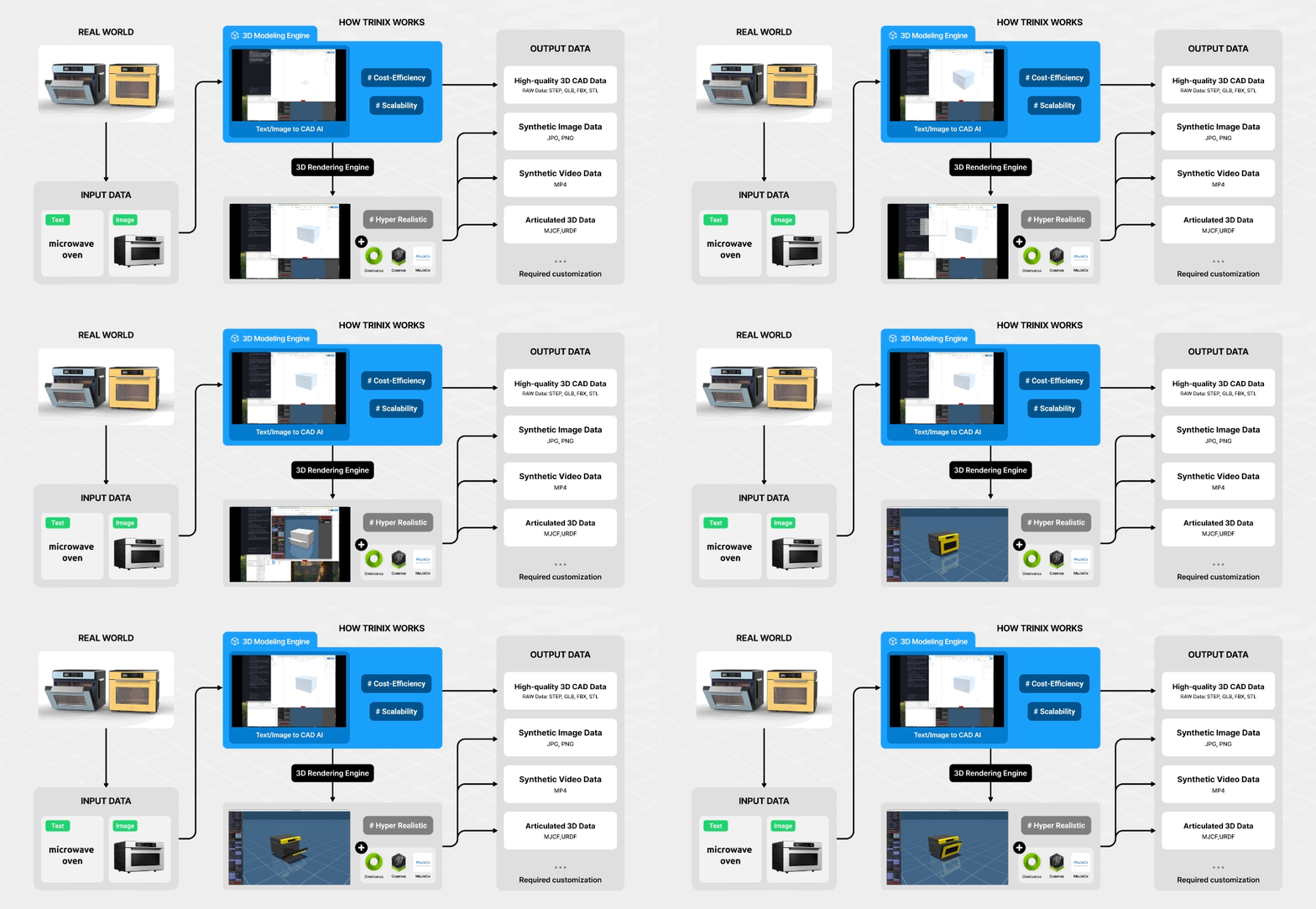
NdotLight introduces TRINIX, an AI-native SimReady asset creation platform that

automates the whole process from modeling to exporting as a simulation-ready file. Check how this infrastructure works.

NdotLight introduces TRINIX, an AI-native SimReady asset creation platform that

automates the whole process from modeling to exporting as a simulation-ready file. Check how this infrastructure works.

Explore the World
NdotLight Builds in Different Solutions

black and white robot illustration

Robotics

Generate high-fidelity simulation data for your robots to learn from.

man in black shirt standing in front of woman in black shirt

Digital Twin

Build and validate factories and new products in simulation first.

close-up photography of black metal gears

Industrial Design

Free yourself from stroke-by-stroke modeling. Automate the process instead.

black flat screen computer monitor

Asset Library

Browse a library of SimReady assets, ready to drop into your simulation.

AI-Native

AI-Native

3D SimReady

3D SimReady

Scalable

Scalable

TRINIX becomes the data layer for Physical AI
and wherever simulation is required.

Robotics

Digital Twin

Product Design

Stop Modeling,
Start Generating

A sentence of Text or an Image is enough to generate a 3D model.

CAD,
not mesh

NURBS-based data, created part-by-part segmented and highly precise.

Infinite Possibilities
of Variation

01

Infinite design generation & editing via prompt

Generate whatever as you want by prompt. Refine directly through conversation.

02

Precise, parametric fine-tuning

Adjust geometry precisely with numeric parameters.

Infinite Possibilities
of Variation

01

Infinite design generation & editing via prompt

Generate whatever as you want by prompt. Refine directly through conversation.

02

Precise, parametric fine-tuning

Adjust geometry precisely with numeric parameters.

Automatic
Physics Injection

Automatic
Physics Injection

No manual physics setup. TRINIX automatically infers and injects physics and articulation data, so every asset comes with joints, mass, friction, and materials, ready to go.

Kinematics

Kinematics

Joints & drive axes
auto-defined

Joints & drive axes
auto-defined

Dynamics

Dynamics

Mass, friction & restitution auto-defined

Mass, friction & restitution auto-defined

Materials

Materials

PBR-based visual & phy
sical material templates.

PBR-based visual & phy
sical material templates.

Collision Mesh to
Ready Smooth Simulation

Collision Mesh to
Ready Smooth Simulation

Complex CAD files can be too heavy for simulation, packed with detail they don't need. TRINIX separates visual and collision mesh to keep simulation smooth.

01

Visual Mesh

02

Collision Mesh

01
02

Export to simulation
Ready Format

Export to simulation
Ready Format

TRINIX supports multi-modal output, exporting to various CAD and Simulation-ready formats.

CAD & 3D

CAD & 3D

STEP, IGES, GLB, FBX, OBJ, STL

STEP, IGES, GLB, FBX, OBJ, STL

Simulation ready

Simulation ready

USD ・ URDF ・ MJCF

USD ・ URDF ・ MJCF

Self-corrective
Closed Loop

Self-corrective
Closed Loop

The secret to keeping assets high-fidelity. When simulation shows an asset's physics data is off, this feedback loop corrects it automatically.

Generation

Generation

Physics

Injection

Physics

Injection

Simulation

Simulation

Physics

Adjustment

Physics

Adjustment

Re-
Simulation

Re-
Simulation

CAPABILITIES
CAPABILITIES

What We Can Make
SimReady

Articulated Objects

Any object with joints, hinges and moving parts.

Deformable Objects

Soft objects like cables, fabrics and sacks that bend and stretch.

Space

Virtual factories and environments built as digital twins.

Environment Manipulation

Environment randomization & item handling.

BENEFITS
BENEFITS

Key Advantages

Scalability

Scalability

Dramatically faster workflows to scale your operations

1,000+ asset variations to complex environments

1,000+ asset variations to complex environments

Cost-efficiency

Cost-efficiency

No manual modeling or post-processing

No jitter removal or parts segmentation required

No jitter removal or parts segmentation required

Hyper-realism

Hyper-realism

Physically accurate rendering and formats

Multi-modal output

Multi-modal output

CAD & SimReady formats

STEP, GLB, STL, USDZ,
USD, MJCF, URDF

STEP, GLB, STL, USDZ,
USD, MJCF, URDF

Plug-and-play

Plug-and-play

with Omniverse™ Isaac Sim™, MuJoCo, Gazebo

FAQ
FAQ

Help Center

Q1.

What is SimReady?

A 3D asset with physics, joints, and materials injected — ready to drop straight into simulation.

Q2.

How is TRINIX different from traditional CAD tools?

Instead of manual modeling, TRINIX auto-generates editable CAD from text or images and injects physics to make it simulation-ready.

Q3.

Is the output editable CAD or mesh?

Editable, parametric CAD (NURBS-based) — not mesh.

Q4.

What formats can it export?

USD, URDF, MJCF and standard CAD formats — ready for simulation.

Q5.

Does it integrate with NVIDIA Isaac Sim?

Yes — one-click export straight into Isaac Sim.

Q6.

Can it convert our legacy CAD?

Yes — ingested with the part tree intact, then physics and joints injected.

Q7.

How long does it take to generate one object?

From a prompt to a simulation-ready asset in minutes.

CONTACT US
CONTACT US

What Do You Want
to Simulate?

By clicking submit, you agree to our Privacy Policy.

By clicking submit, you agree to our Privacy Policy.

[Our Locations]

Korea HQ

18F, Kins Tower, 8 Seongnam-daero 331beon-gil, Bundang-gu, Seongnam-si, Gyeonggi-do, Republic of Korea

R&D Center

Office 403, Global Biz Center, 43 Changeop-ro, Sujeong-gu, Seongnam-si, Gyeonggi-do, Republic of Korea

US Office

3003 N 1st St., San Jose, CA 95134, United States

ⓒ 2026 NDotLight Co., Ltd.

Korea HQ

18F, Kins Tower, 8

Seongnam-daero 331,

Bundang-gu,

Seongnam-si,

Gyeonggi-do,

Republic of Korea

R&D Center

Office 403,

Global Biz Center, 43 Changeop-ro,

Sujeong-gu,

Seongnam-si,

Gyeonggi-do,

Republic of Korea

US Office

3003 N 1st St.,

San Jose,

CA 95134,

United States

ⓒ 2026 NDotLight Co., Ltd.